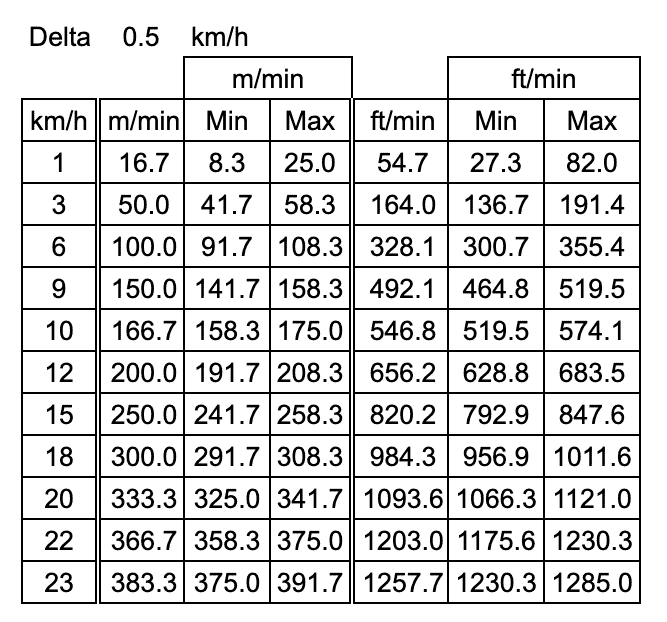
This page contains instructions on how to calibrate the speed for the Elite E8s.
The NoblePro treadmills are calibrated during the manufacturing process and are normally accurate within +/-0.5 km/hr. The calibration of the speed is however not static as factors like belt stretch and components seeding or wearing out over time will effect the readings.
It is therefore recommended to calibrate your treadmill from time to time to ensure the more accurate data is captured for your session.
Note: This procedure is for advanced users and to be undertaken at one’s own risk.
What will I need?
To ensure accurate calibration of the speed you will need a measuring instrument called a tachometer. We recommend using one of the following tachometers:
Sealey TA050 Digital Tachometer – Amazon Link OR Protmex Digital Tachometer (MS6208A) – Amazon Link
It is not recommended to calibrate the treadmill speed using any other device as accuracy is likely going to suffer as a result.
How to calibrate the speed
1. With the safety key in place start the treadmill and record the running belt speed using the recommended tachometer at 1 km/hr, 10 km/hr, and 20 km/hr.
Note: Ensure you follow the tachometer manufacturer’s user’s manual to measure in km/hr using the correct attachment. If the device does not measure in km/hr ensure to convert the values accordingly.
2. Stop the treadmill and remove the safety key.
3. Press the START and SPEED (+) buttons at the same time replace the safety key back.
This will bring up the advanced settings menu.
4. Press the START button until P06 appears on the screen. This is the calibration value at 1 km/h.
(default = 61)
5. Use the SPEED (+) and (-) buttons to increase or decrease the value by 1 to adjust the speed.
6. Press START button until P07 appears on the screen. This is the calibration value at 10 km/h.
(default = 284)
7. Use the SPEED (+) and (-) buttons to increase or decrease the value by 1 to adjust the speed.
8. Press START button until P08 appears on the screen. This is the calibration value at 20 km/h.
(default = 56)
9. Use the SPEED (+) and (-) buttons to increase or decrease the value by 1 to adjust the speed.
10. Press the STOP button once complete. This will save the values.
11. Measure the running belt speed again with the new values saved as per step 1.
12. Repeat steps 1-11 until the readings are within +/- 0.5 km/hr of the displayed speed.
Congratulations!
Your treadmill speed is now calibrated.